




 Русский (RU)
 Українська (UK)
 Türkçe (TR)
 Italiano (IT)
 Français (FR)
 Português (PT)
 中文 (中国) (ZH)
 Español (ES)
 日本語 (JA)
 ไทย (TH)
 Deutsch (DE)
 Ελληνικά (EL)
 Polski (PL)
 Bahasa Indonesia (ID)
 Nederlands (NL)
 العربية (AR)
 한국어 (KO)

You meet countless people during academic sessions, and student business cards help you turn those quick interactions into lasting connections.
This guide answers what to include, how to design your card, and where to print it.
You’ll explore examples, practical tips, and small design choices that make a real difference.
Let’s step into the essentials and create student business cards that support your goals and open new opportunities.
Why Student Business Cards Are a Smart Move
Student business cards give you a clear way to introduce yourself during academic sessions and other opportunities. They help you turn brief conversations into memorable exchanges by making it easy for others to understand who you are and what you’re interested in.
And yes, even students like you can now have business cards. They’re increasingly common because they support connection in a simple, practical way.
They’re especially helpful for networking, where you often have only a minute to share your details with tutors, speakers, or visiting professionals. A card keeps your information accessible after the conversation ends.
They also support internships and insight days, giving you a quick, tidy way to share your academic identity without exchanging phones.
Across university life, including events, competitions, societies, and showcases, student business cards help you share your subject focus, interests, and key links with ease.
They’re also valuable for early entrepreneurship, giving you a simple way to present your project or idea clearly and consistently.
Overall, student business cards make your interactions smoother and more organised wherever you meet new people.
What Should Be on a Student Business Card? (Complete Breakdown)
A student business card should include your name, subject focus, professional email, LinkedIn, and a simple role. Add a short tagline or QR code if useful.
Here’s a quick breakdown of what each element means and how to choose what belongs on your card.
1. Your Name and Academic Identity
Your name and academic identity help people understand who you are immediately. Include your full name, your subject or major, and your year of study or expected graduation date.
These details make introductions smoother at events, panels, or academic competitions, such as a business competition. A clear academic identity shows direction and commitment.
2. Your Contact Information (Professional and Clean)
Your contact information should look polished and easy to use. A professional email is essential, and a simple Gmail with your name often works better than a school address.
You can include your phone number if you’re comfortable, and LinkedIn or a personal website lets others learn more about you without searching.
3. Your Role or Focus Area
A short role helps people understand your interests quickly. Choose something grounded and honest, such as “Aspiring Software Engineer,” “Business Student | Interested in Marketing,” or “STEM Student | Research and Innovation.”
Keep it realistic and aligned with your current goals so it feels authentic.
4. A Short Tagline or Value Statement
A tagline gives a little more context about your interests or approach. Choose something snappy and memorable, such as “Building ideas that matter,” “Design with purpose,” or “Passionate about sustainable design.”
Keep it short enough to read instantly and ensure it supports your academic or creative direction.
5. Social and Portfolio Links
Add only the links that represent you professionally. LinkedIn is ideal because it shows your experience, goals, and achievements.
You can include a portfolio, GitHub, or website if it reflects your work clearly. Avoid personal social media platforms unless they directly support your subject or niche.
6. QR Codes
A QR code can save space and direct people to important links such as your portfolio, CV, or website.
Ensure it prints clearly with good contrast and enough white space around the edges. Test it on different devices and distances before finalising your design.
7. Optional Extras That Can Level Up Your Card
Optional details can help your card stand out when used lightly. You might include:
- Additional languages you speak
- Key software or technical skills
- Notable achievements or awards
- Relevant society roles or positions
- A simple personal logo or icon
- Small design elements that support your personal branding
These extras should add clarity, not clutter.
Entrepreneurship
In-person
Cultivate your startup vision in San Francisco, the...

Business Management
In-person
Cultivate leadership skills in Cambridge, where science and...

Student Business Cards Examples
Student business cards come in many styles, from minimalist academic designs to creative and entrepreneurial layouts. Each one shows your goals clearly.
Here are examples to help you choose what fits your subject, interests, and style.
Minimalist Academic Card
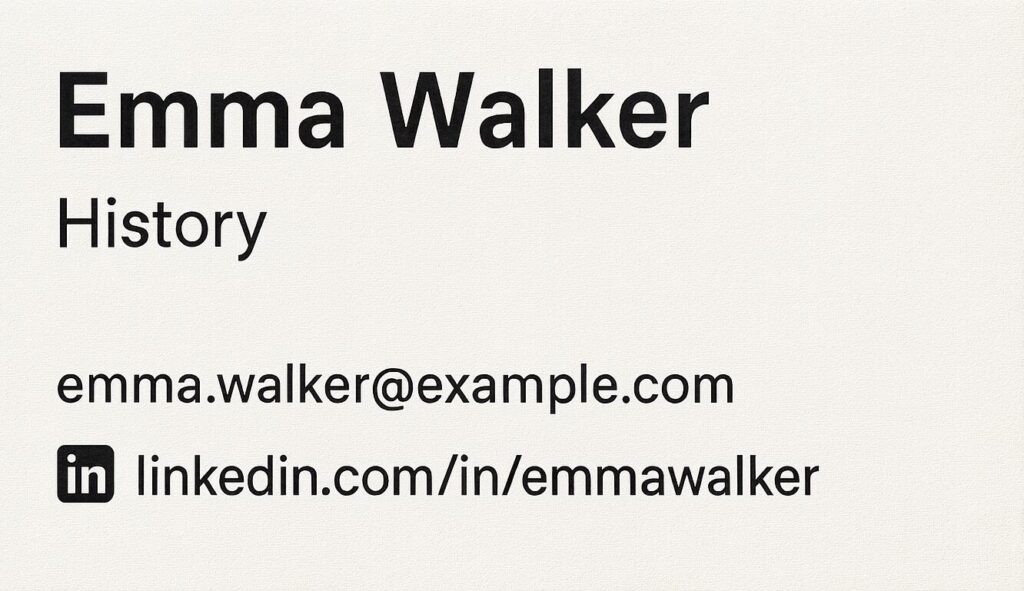
A minimalist academic card focuses on clarity and simplicity. It usually includes your name, subject or major, email, and LinkedIn.
This style works well if you want a clean design that feels calm and professional. It suits academic events, research meetups, and settings where clarity matters more than decoration.
Creative Portfolio Card (Design, Film, Art Students)
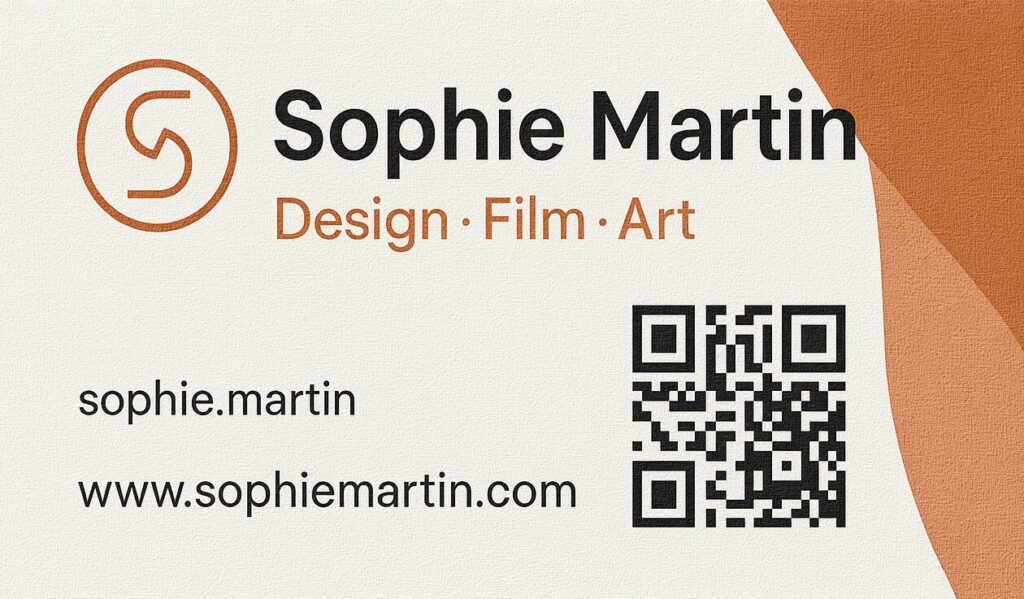
A creative portfolio card gives space for visual expression. You might include a small logo, a distinctive colour palette, or a subtle graphic that reflects your style.
A QR code linking directly to your portfolio or showreel helps people explore your work instantly. This layout suits design reviews, exhibitions, or creative industry events.
STEM or Research Student Card

STEM cards often highlight your technical interests. You might include links to GitHub, research projects, or a website showcasing your work.
A short role, such as “Aspiring Data Scientist” or “Research Student | Robotics” helps people understand your direction quickly. This style works well for hackathons, research fairs, or academic talks.
Student Entrepreneur Card
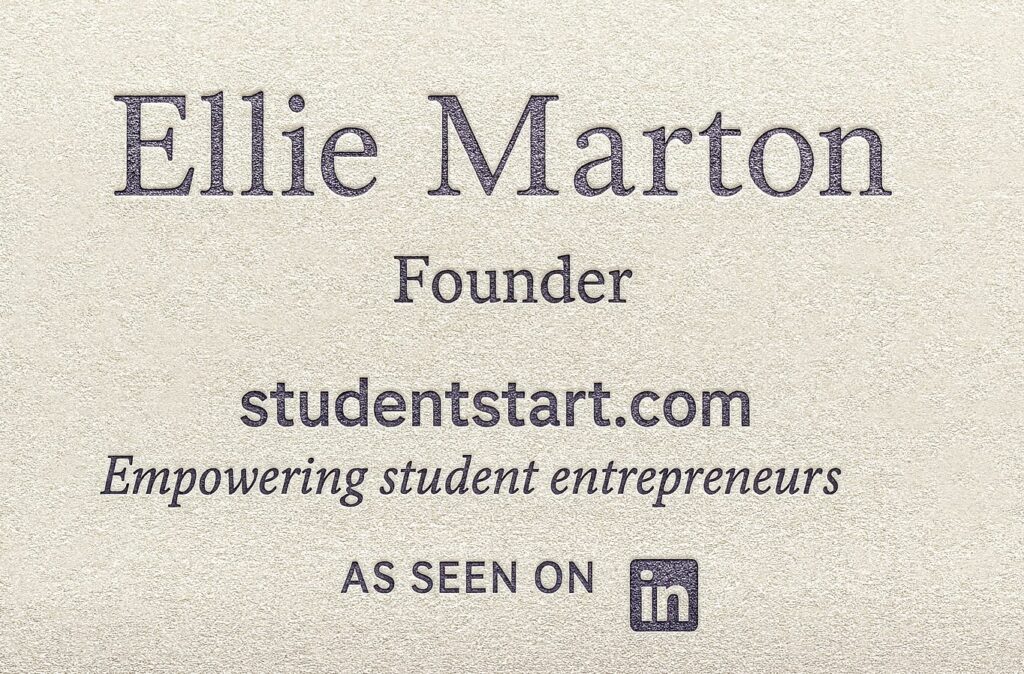
A student entrepreneur card focuses on your project or idea. Include your role, such as “Founder,” a simple website, and a tagline that explains what your project does.
If you’re participating in a business competition or preparing for a business plan competition, this type of card helps people understand the concept behind your work.
High School Student Card Examples
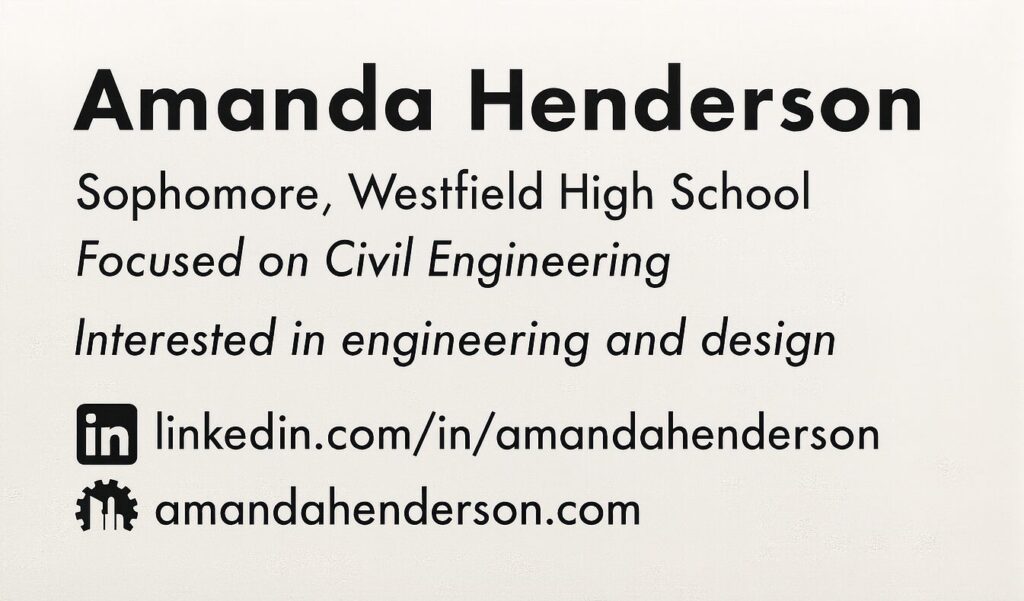
High school cards emphasise interests and future direction rather than experience. You might include your name, school year, subject interests, and a single link such as LinkedIn or a small portfolio website.
A simple tagline like “Interested in engineering and design” helps others understand your aspirations quickly.
Join the Immerse Education 2025 Essay Competition
Follow the instructions to write and submit your best essay for a chance to be awarded a 100% scholarship.

How to Design Student Business Cards
Designing a student business card starts with a clear layout, readable typography, and colours that support your identity.
Here’s a short guide on how to shape your layout, colours, and style effectively.
1. Choosing a Layout
Your layout shapes how people read your card. Horizontal layouts feel familiar and organised, while vertical layouts offer a more creative and standout structure.
This table shows the difference:
| Layout Style | Best For | Strengths |
| Horizontal | Academic or professional settings | Familiar, easy to read, works well with longer names and roles |
| Vertical | Creative fields or portfolio-focused cards | Unique, modern, attention-grabbing |
Whichever style you choose, keep spacing even and avoid placing too much information close together. A clear layout helps your key details stand out immediately.
2. Colours and Branding
Colour choices influence how your card feels. Soft, neutral colours create a calm academic tone, while bold colours can highlight creativity or energy. You can use your school colours or develop a simple personal palette as long as it stays consistent.
Research also suggests that using neutral text on a coloured background can improve readability, because the contrast helps people process information more quickly.
Aligning your card’s colours with your CV, LinkedIn header, or email signature builds a stronger sense of personal branding.
3. Typography
Readable fonts are essential for a professional card. Clean, reliable options include Helvetica, Inter, Montserrat, Lato, Garamond, or Source Sans Pro.
Use one main font for clarity, and if needed, pair it with a simple secondary typeface from the same family. Avoid overly stylised or script fonts as they reduce readability when printed small.
4. Using Templates (Pros and Cons)
Templates make the design process quicker, but they need customisation to avoid looking generic. Here’s a comparison:
| Using a Template | Pros | Cons |
| Yes | Easy to start, avoids layout mistakes, and helps beginners build structure | Can look generic if not customised; limited flexibility |
| No | Fully personalised, unique to your style and goals | Takes more time and design confidence |
Small adjustments to colour, spacing, icons, or typography help your card feel personal and distinctive while keeping the strong base of the template.
5. Adding Icons, Logos and Small Graphics
Simple visuals can support clarity when used carefully. Small icons for email or LinkedIn help people scan your card quickly, and a subtle personal logo can express your style.
Avoid large graphics or anything that competes with your text. Visual elements should guide attention, not distract from essential information.
6. Accessibility Considerations
Good accessibility improves readability for everyone. Choose colours with enough contrast, ensure text sizes are comfortable to read, and place QR codes away from edges to avoid scanning issues.
A clear visual hierarchy helps people find your key details even at a glance.
How to Print Student Business Cards (Step-by-Step Guide)
Printing your student business cards is simple when you follow a few key steps. Each stage takes you from a finished design to polished cards you can use at events and opportunities.
Here’s how to print cards that stay professional, memorable, and ready to help you connect with others.
1. Choosing Card Stock
Card stock affects how your card feels in someone’s hand. Thicker cards (around 300–350 gsm) feel sturdy and professional, while thinner cards can look less durable.
Matte finishes create a soft, modern feel, while gloss adds shine and works well for bold colours or creative layouts. Choose a finish that supports your style without overwhelming your details.
Popular choices include 350 gsm matte stock for a clean professional feel, soft-touch laminate for a smooth finish, linen texture for subtle detail, or recycled kraft stock if you prefer an eco-friendly look.
2. Choosing Print Size
Business card sizes vary slightly by region, but most fall within similar dimensions. The standard size is about 85 x 55 mm in the UK and Europe, and 3.5 x 2 inches in the United States.
Creative fields sometimes use square or vertical formats, but keeping your card within standard sizing ensures it fits easily into wallets and card holders.
3. Uploading Your Design
Before sending your file to print, check that your design includes bleed (usually 3 mm), keeps all text within a safe area, and uses a resolution of at least 300 dpi. Exporting your design as a PDF ensures the best quality.
Small mistakes, such as crowded edges or low-resolution images, can affect the final output, so checking these details protects your work.
4. Where to Get Student Business Cards Printed
- Local Print Shops. Offer personalised guidance, quick feedback, and the chance to check card stock in person.
- Online Printing Services. Convenient, fast, and usually offer more finishes, colours, and layout options.
- University Facilities. Some campuses provide student-friendly printing, often at discounted rates for academic sessions or society projects.
5. Digital Cards vs Printed Cards
| Format | Pros | Cons |
| Digital Cards | Easy to update, ideal for virtual events, quick QR-code sharing | Less personal, can feel forgettable, relies on technology |
| Printed Cards | Memorable, tactile, and makes a strong impression in person | Harder to update, requires reprinting, can be lost or damaged |
Students often use both: digital cards for quick online exchanges and printed cards for in-person moments where a tangible handover makes a stronger impact.
Student Business Cards for Different Purposes
You can create different versions of your student business cards for internships, societies, entrepreneurship, and school-related activities. Each version highlights the details that matter most in that setting.
With that in mind, here are the different student business cards you can prepare for specific goals.
For Internships
Internship cards should highlight your academic identity and key professional links. Include your name, subject, expected graduation year, and a role such as “Aspiring Analyst” or “Engineering Student.”
Add LinkedIn, and include a portfolio link if relevant. Keep the design clear so recruiters can recall you quickly.
For University Events and Societies
Cards for university events should show your subject and any campus involvement. If you hold a society role, include it, such as “Finance Society Treasurer.”
A short tagline can reflect your interests. These cards help you connect with tutors, peers, and visiting speakers.
For Early Entrepreneurship
Entrepreneurship cards should highlight your project or idea. Include your role, such as “Founder,” a website link, and a short tagline that captures your concept. A clear card supports your student elevator pitch and helps others understand your direction.
You can also link to a student business plan template to show how you’re developing your idea. A QR code can lead to a landing page, pitch deck, or portfolio for deeper insight.
For High School Students
High school cards focus on interests and academic goals rather than experience. Include your name, school year, subject interests, and one link, such as LinkedIn or a small portfolio site.
A simple tagline like “Exploring engineering and design” communicates your direction clearly.
Mistakes to Avoid When Creating Student Business Cards
Even strong student business cards can lose their impact when small mistakes get in the way. Avoiding them helps your card stay clear, professional, and easy to use.
Here are some common mistakes to avoid.
1. Too Much Information
Too much information makes your card crowded. Keep only your name, subject, role, professional email, and key links. Save extra details for your LinkedIn or portfolio. A simple layout is easier to remember.
2. Unprofessional Email or Socials
Use a professional email and only link accounts that support your academic or career goals. Avoid personal or novelty emails, as they weaken your credibility.
3. Overly Decorative Design
Too many colours, icons, or stylised fonts can distract from your details. Choose a clean, minimal design that keeps your text easy to read.
4. Hard-to-Scan QR Codes
QR codes must be large, clear, and easy to scan. Avoid placing them near edges and test them on different devices before printing.
5. Misleading Titles
Use honest titles that match your experience, such as “Engineering Student” or “Aspiring Designer.” Inflated roles can harm your credibility.
6. Ignoring Practical Details
Glossy cards are harder to write on, and cluttered backs leave no space for notes. Keep the back simple and check your school’s branding rules if you use logos.
Are Student Business Cards a Good Idea?
Student business cards are a good idea if you want to make a clear, professional impression quickly. They help you share your details with confidence and show others that you take your academic or career interests seriously.
They’re especially useful at events, fairs, talks, and competitions, where brief conversations can lead to future opportunities. A simple card gives people a tangible reminder of who you are.
Many students also find that having a card boosts their confidence and makes introductions smoother, even when they’re still building experience.
Digital profiles like LinkedIn remain essential, but printed cards add a personal touch in face-to-face settings. Used together, they strengthen your networking across both online and in-person spaces.
How to Use Your Student Business Cards Effectively
Using your student business cards well helps you make connections that last beyond a quick conversation. Here’s how to use them with clarity and purpose.
- Share Your Card at the Right Moments: Give your card after a genuine conversation, not immediately. It feels more natural and helps people remember you.
- Be Selective and Intentional: Hand your card to people you want to stay connected with, such as potential mentors, collaborators, or future contacts.
- Store Contacts Properly: Save the details from cards you receive, and add a short note to remember what you discussed. It makes following up easier.
- Use Both Printed and Digital Versions: Printed cards work well for events, while digital cards or QR codes help when sharing information online or quickly.
- Follow Up Thoughtfully: Send a short message after meeting someone. Mention your conversation to keep the connection active and genuine.
Student Business Card Templates You Can Copy
These simple templates give you a starting point you can personalise. Each one keeps your details clear and professional while matching different goals, subjects, or levels of experience.
Template 1 — Classic Academic Card
Name
Subject | University | Expected Graduation
Professional Email
LinkedIn URL
Optional: Short tagline (e.g., Curious about behavioural science)
Template 2 — Portfolio / Creative Card
Name
Creative Field (e.g., Filmmaker | Graphic Designer | Illustrator)
Professional Email
Portfolio Link or QR Code
Optional: Short tagline (e.g., Visual stories with impact)
Template 3 — Student Entrepreneur Card
Name
Founder | Project Name
Website or Landing Page
Professional Email
QR Code to pitch deck or prototype
Optional: Tagline (e.g., Building tools that solve everyday problems)
Template 4 — High School Student Card
Name
School Year | Subject Interests
Professional Email
LinkedIn or a simple portfolio site
Optional: Tagline (e.g., Exploring engineering and design)
FAQs
What should be on a student business card?
Include your name, subject or focus area, professional email, and one or two key links. Keep it clear, minimal, and easy to scan.
Can a student have a business card?
Yes. Students can use business cards for networking, events, competitions, and early career opportunities. A simple, professional card helps you make memorable, confident introductions.
Where can I get student business cards?
You can print them through local print shops, online printers, or university facilities. Choose a service offering good card stock, clear finishes, and reliable delivery.
Are student business cards a good idea?
Yes. They help you share your details quickly, leave a professional impression, and build connections during internships, events, academic sessions, and early entrepreneurial projects.
Final Thoughts
Student business cards are simple tools that make a strong difference in how you present yourself. They show intention, confidence, and a willingness to connect.
They’re also affordable and easy to create, making them a practical way to stand out during events, internships, or early career conversations.
A clear, well-designed student business card helps others remember who you are, even after a brief interaction.
If you’re ready to strengthen your networking and entrepreneurial skills, explore our Business Management and Entrepreneurship programmes to build confidence, sharpen your ideas, and develop the tools you need for future opportunities.